This page shows you two complementary ways to evaluate models tracked in W&B: use W&B Weave for LLM and GenAI evaluations, and use W&B Tables for prediction analysis across runs and epochs.

Evaluate models with Weave

W&B Weave is a purpose-built toolkit for evaluating LLMs and GenAI applications. It provides evaluation capabilities including scorers, judges, and detailed tracing to help you understand and improve model performance. Weave integrates with W&B Models so you can evaluate models stored in W&B Registry.
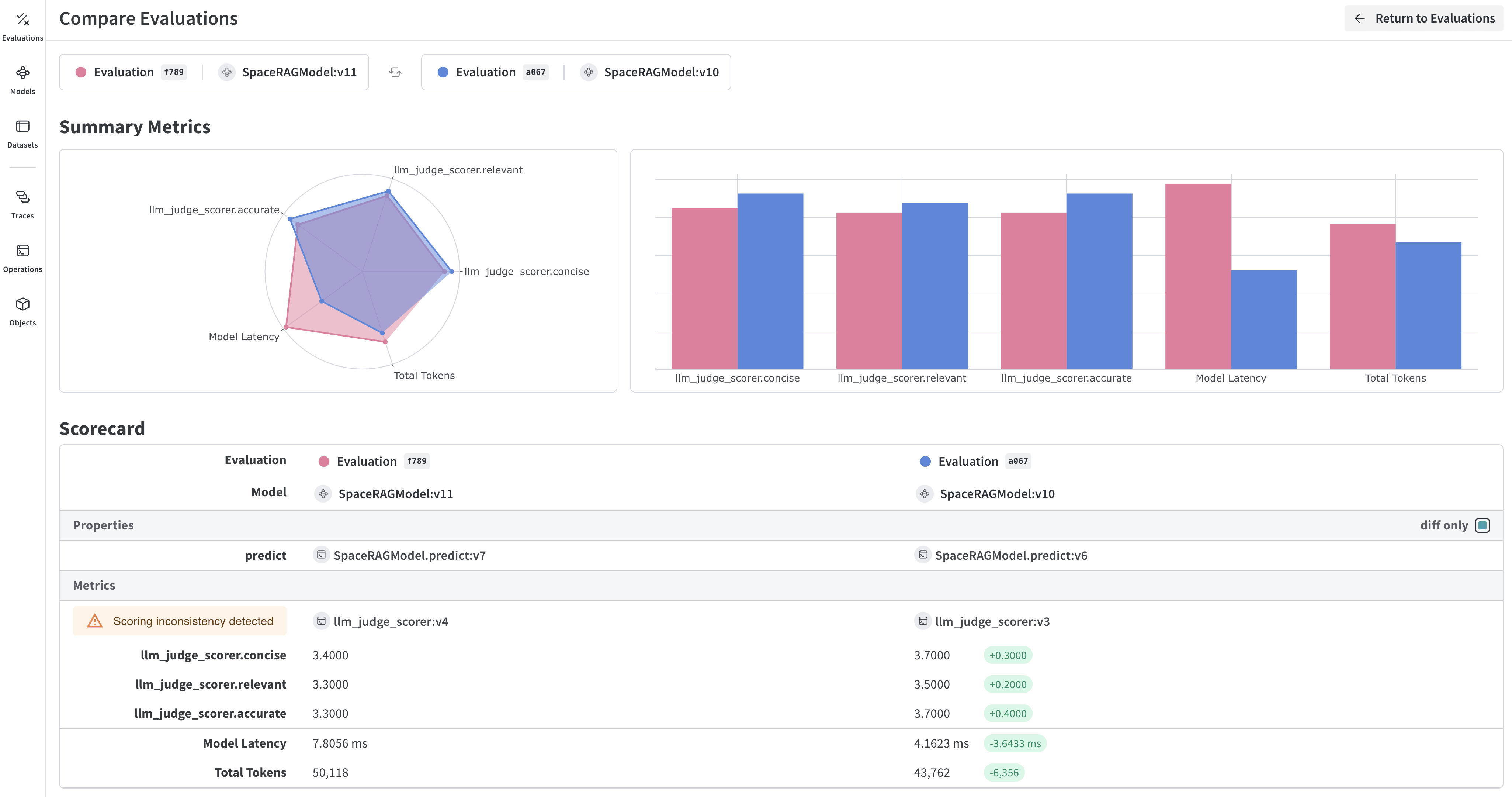
Weave evaluation dashboard showing model performance metrics and traces

Key features for model evaluation

Weave provides the following capabilities for model evaluation:
  • Scorers and judges: Pre-built and custom evaluation metrics for accuracy, relevance, coherence, and more.
  • Evaluation datasets: Structured test sets with ground truth for systematic evaluation.
  • Model versioning: Track and compare different versions of your models.
  • Detailed tracing: Debug model behavior with complete input/output traces.
  • Cost tracking: Monitor API costs and token usage across evaluations.

Evaluate a model from Registry

Download a model from W&B Registry and evaluate it using Weave:
import weave
import wandb
from typing import Any

# Initialize Weave
weave.init("your-entity/your-project")

# Define a ChatModel that loads from W&B Registry
class ChatModel(weave.Model):
    model_name: str
    
    def model_post_init(self, __context):
        # Download model from W&B Registry
        with wandb.init(project="your-project", job_type="model_download") as run:
            artifact = run.use_artifact(self.model_name)
            self.model_path = artifact.download()
            # Initialize your model here
    
    @weave.op()
    async def predict(self, query: str) -> str:
        # Your model inference logic
        return self.model.generate(query)

# Create evaluation dataset
dataset = weave.Dataset(name="eval_dataset", rows=[
    {"input": "What is the capital of France?", "expected": "Paris"},
    {"input": "What is 2+2?", "expected": "4"},
])

# Define scorers
@weave.op()
def exact_match_scorer(expected: str, output: str) -> dict:
    return {"correct": expected.lower() == output.lower()}

# Run evaluation
model = ChatModel(model_name="wandb-entity/registry-name/model:version")
evaluation = weave.Evaluation(
    dataset=dataset,
    scorers=[exact_match_scorer]
)
results = await evaluation.evaluate(model)

Integrate Weave evaluations with W&B Models

To connect Weave evaluation results with the models and runs you track in W&B, use the integration workflow described next. The Models and Weave Integration Demo shows the complete workflow for:
  1. Load models from Registry: Download fine-tuned models stored in W&B Registry.
  2. Create evaluation pipelines: Build evaluations with custom scorers.
  3. Log results back to W&B: Connect evaluation metrics to your model runs.
  4. Version evaluated models: Save improved models back to the Registry.
Log evaluation results to both Weave and Models:
# Run evaluation with W&B tracking
with weave.attributes({"wandb-run-id": wandb.run.id}):
    summary, call = await evaluation.evaluate.call(evaluation, model)

# Log metrics to W&B Models
wandb.run.log(summary)
wandb.run.config.update({
    "weave_eval_url": f"https://wandb.ai/{entity}/{project}/r/call/{call.id}"
})

Advanced Weave features

Custom scorers and judges

Create evaluation metrics tailored to your use case:
@weave.op()
async def llm_judge_scorer(expected: str, output: str, judge_model) -> dict:
    prompt = f"Is this answer correct? Expected: {expected}, Got: {output}"
    judgment = await judge_model.predict(prompt)
    return {"judge_score": judgment}

Batch evaluations

Evaluate multiple model versions or configurations:
models = [
    ChatModel(model_name="model:v1"),
    ChatModel(model_name="model:v2"),
]

for model in models:
    results = await evaluation.evaluate(model)
    print(f"{model.model_name}: {results}")

Next steps

For more information, see the following:

Evaluate models with W&B Tables

W&B Tables let you log structured predictions and inspect them interactively in the W&B UI. Use Tables to:
  • Compare model predictions: View side-by-side comparisons of how different models perform on the same test set.
  • Track prediction changes: Monitor how predictions evolve across training epochs or model versions.
  • Analyze errors: Filter and query to find commonly misclassified examples and error patterns.
  • Visualize rich media: Display images, audio, text, and other media types alongside predictions and metrics.
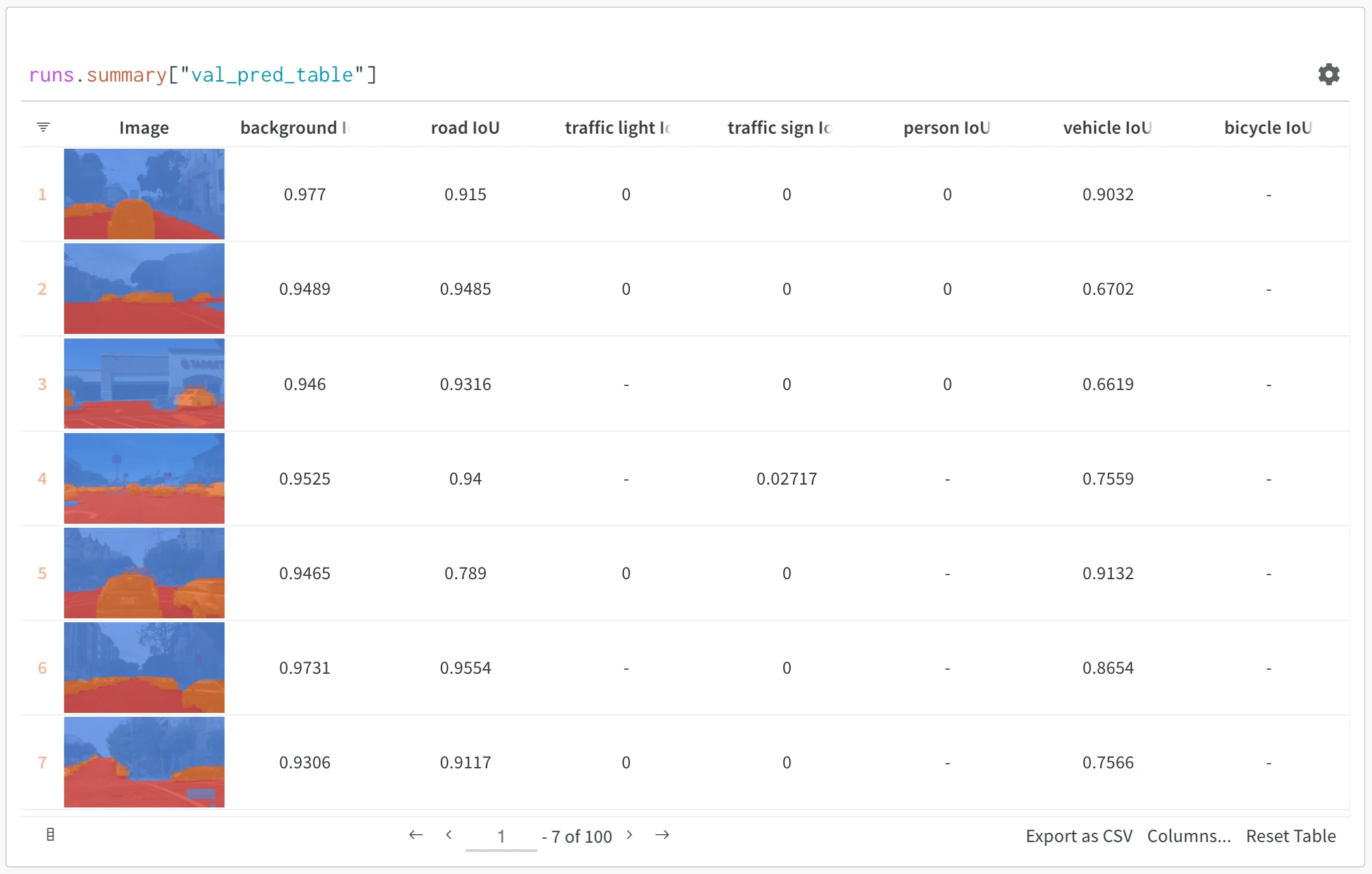
Example of predictions table showing model outputs alongside ground truth labels

Basic example: Log evaluation results

import wandb

# Initialize a run
run = wandb.init(project="model-evaluation")

# Create a table with evaluation results
columns = ["id", "input", "ground_truth", "prediction", "confidence", "correct"]
eval_table = wandb.Table(columns=columns)

# Add evaluation data
for idx, (input_data, label) in enumerate(test_dataset):
    prediction = model(input_data)
    confidence = prediction.max()
    predicted_class = prediction.argmax()
    
    eval_table.add_data(
        idx,
        wandb.Image(input_data),  # Log images or other media
        label,
        predicted_class,
        confidence,
        label == predicted_class
    )

# Log the table
run.log({"evaluation_results": eval_table})

Advanced table workflows

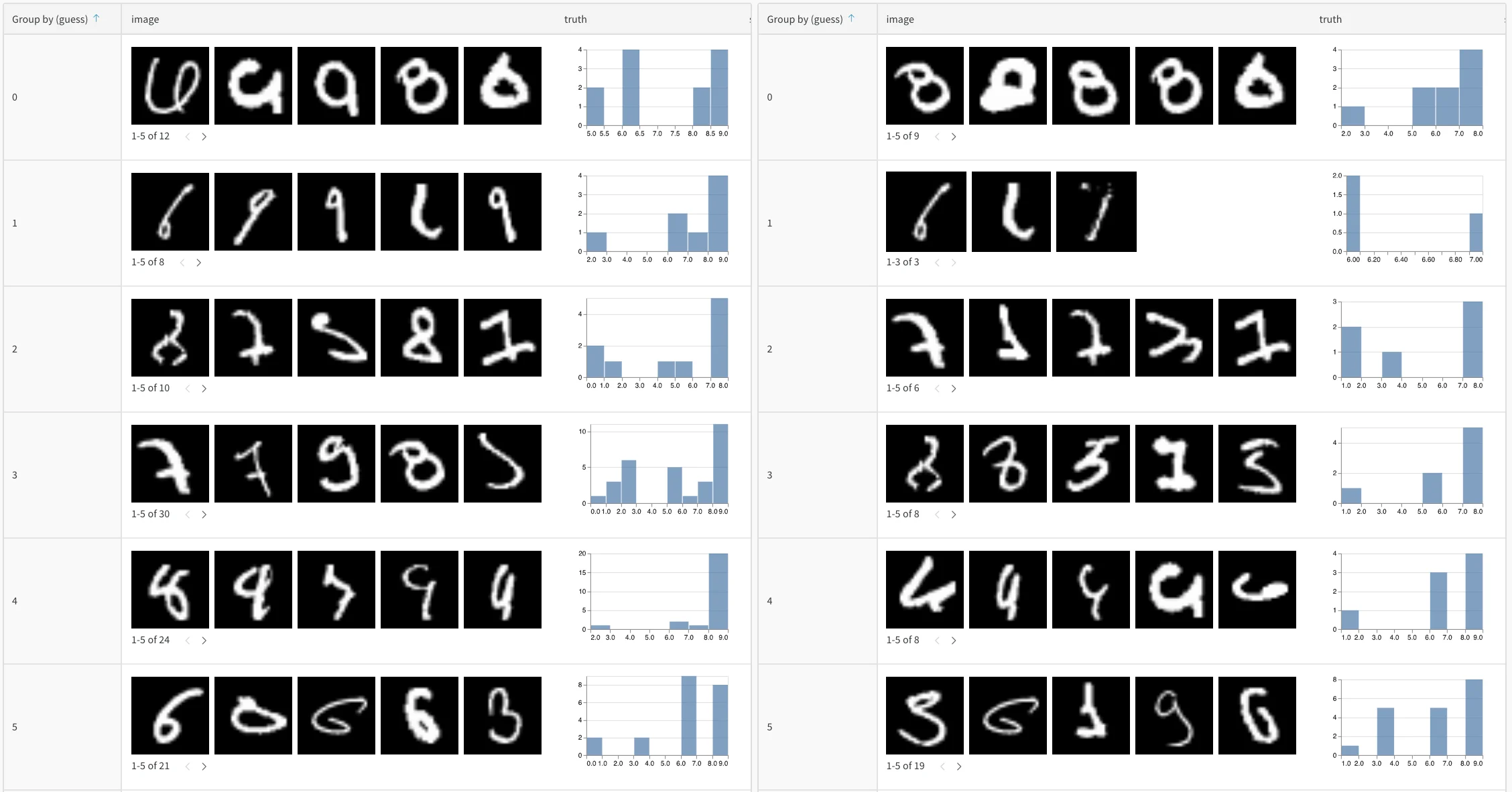
Compare multiple models

Log eval tables from different models to the same key for direct comparison:
# Model A evaluation
with wandb.init(project="model-comparison", name="model_a") as run:
    eval_table_a = create_eval_table(model_a, test_data)
    run.log({"test_predictions": eval_table_a})

# Model B evaluation  
with wandb.init(project="model-comparison", name="model_b") as run:
    eval_table_b = create_eval_table(model_b, test_data)
    run.log({"test_predictions": eval_table_b})
Side-by-side comparison of model predictions across training epochs

Track predictions over time

Log tables at different training epochs to visualize improvement:
for epoch in range(num_epochs):
    train_model(model, train_data)
    
    # Evaluate and log predictions for this epoch
    eval_table = wandb.Table(columns=["image", "truth", "prediction"])
    for image, label in test_subset:
        pred = model(image)
        eval_table.add_data(wandb.Image(image), label, pred.argmax())
    
    wandb.log({f"predictions_epoch_{epoch}": eval_table})

Interactive analysis in the W&B UI

After you log a table, you can use the W&B UI to explore the results. You can:
  • Filter results: Click column headers to filter by prediction accuracy, confidence thresholds, or specific classes.
  • Compare tables: Select multiple table versions to see side-by-side comparisons.
  • Query data: Use the query bar to find specific patterns (for example, "correct" = false AND "confidence" > 0.8).
  • Group and aggregate: Group by predicted class to see per-class accuracy metrics.
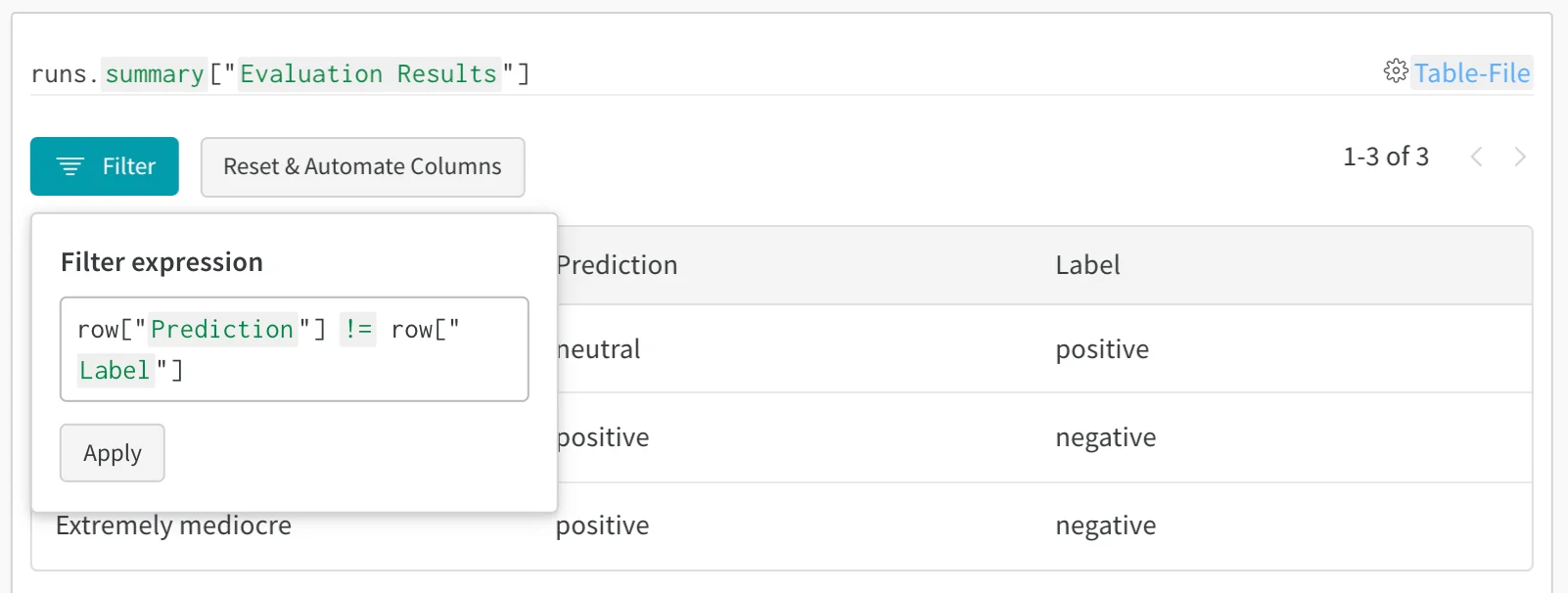
Interactive filtering and querying of evaluation results in W&B Tables

Example: Error analysis with enriched tables

The following example creates a mutable table, logs initial predictions, then adds confidence and error type columns for deeper analysis:
# Create a mutable table to add analysis columns
eval_table = wandb.Table(
    columns=["id", "image", "label", "prediction"],
    log_mode="MUTABLE"  # Allows adding columns later
)

# Initial predictions
for idx, (img, label) in enumerate(test_data):
    pred = model(img)
    eval_table.add_data(idx, wandb.Image(img), label, pred.argmax())

run.log({"eval_analysis": eval_table})

# Add confidence scores for error analysis
confidences = [model(img).max() for img, _ in test_data]
eval_table.add_column("confidence", confidences)

# Add error types
error_types = classify_errors(eval_table.get_column("label"), 
                            eval_table.get_column("prediction"))
eval_table.add_column("error_type", error_types)

run.log({"eval_analysis": eval_table})